四、微服务架构编码构建—cloud-provider-payment8001微服务提供者支付Module

1、微服务工程构建步骤

【1】消费者-提供者调用关系
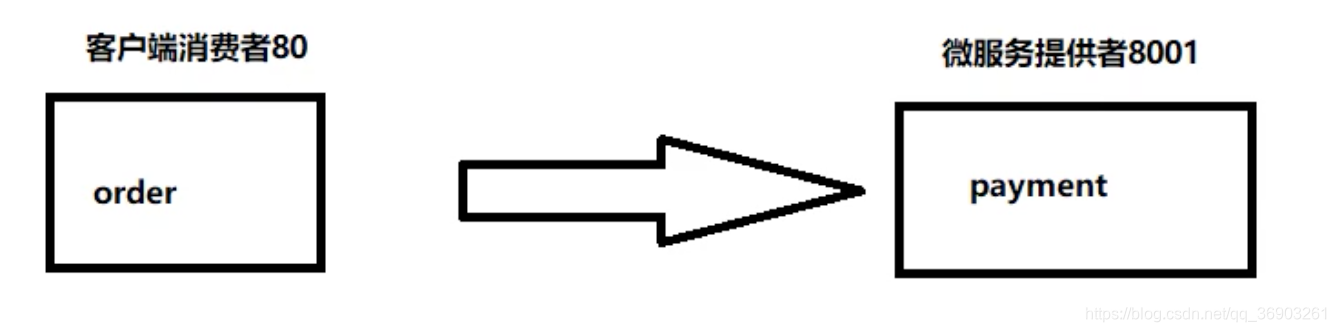
在这里插入图片描述

【2】服务提供者创建步骤
  • 建moudle
  • 改pom
  • 写yml
  • 主启动
  • 业务类
  • 测试

2、微服务提供者支付moudle模块cloud-provider-payment8001

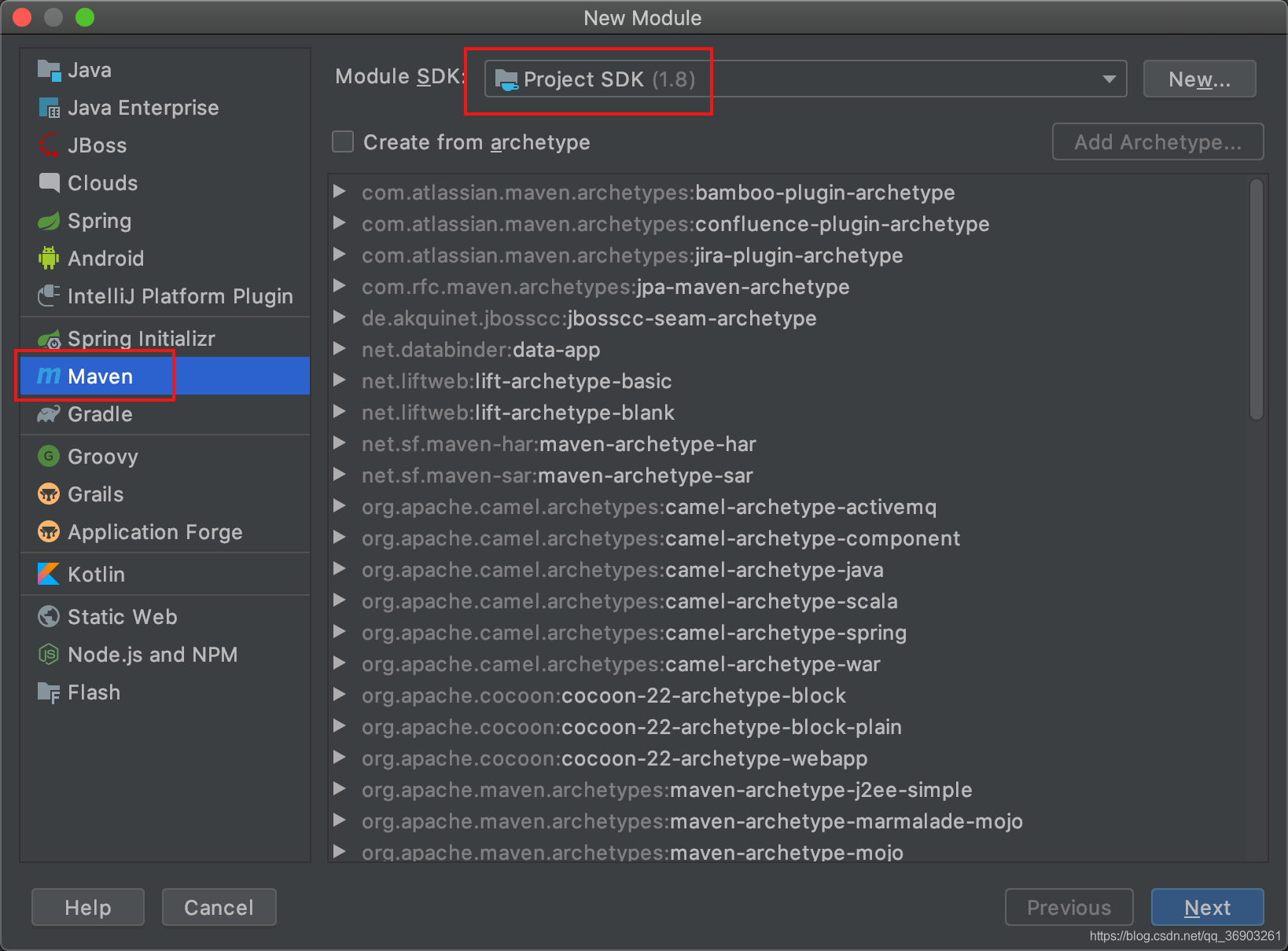
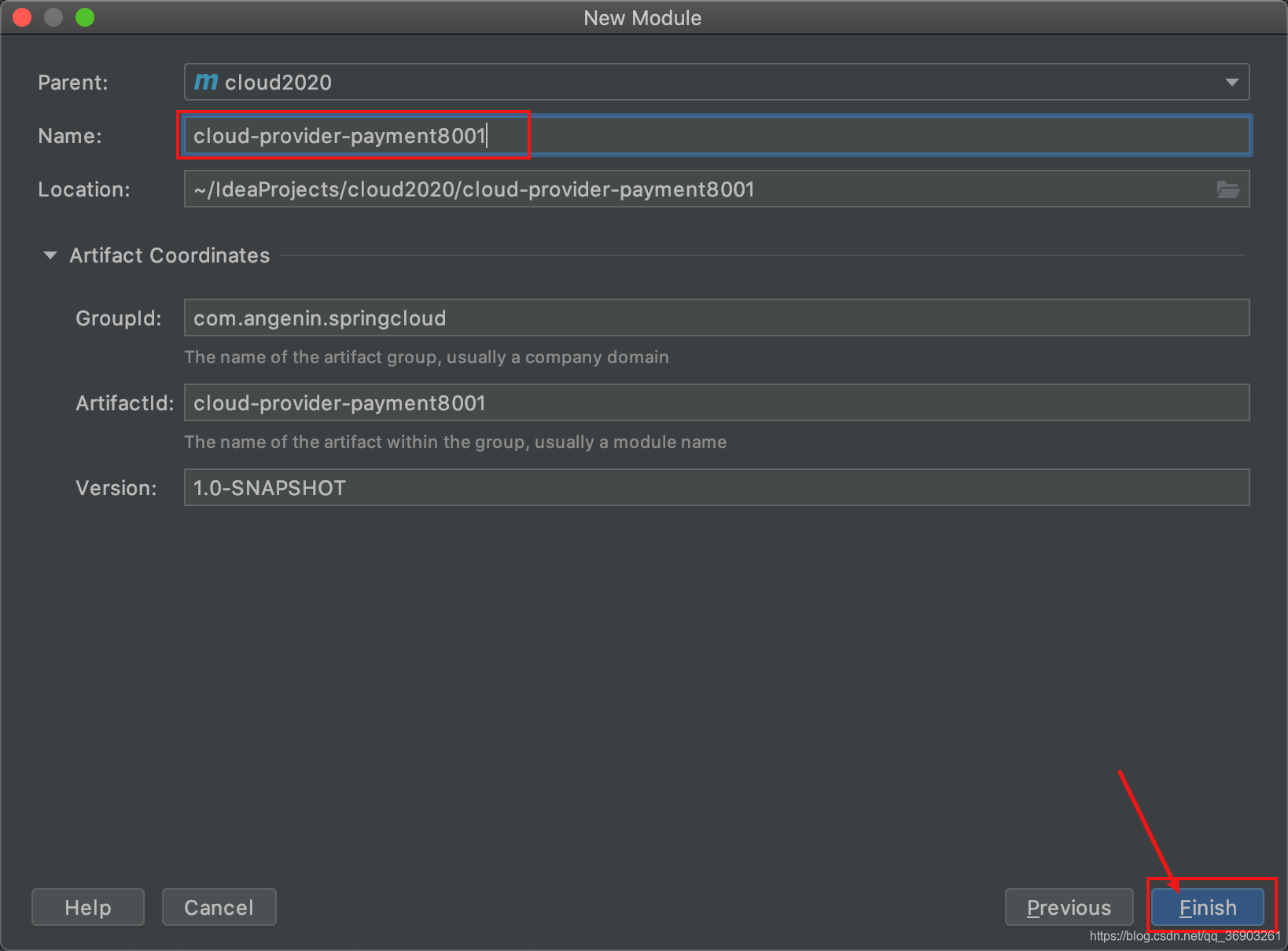
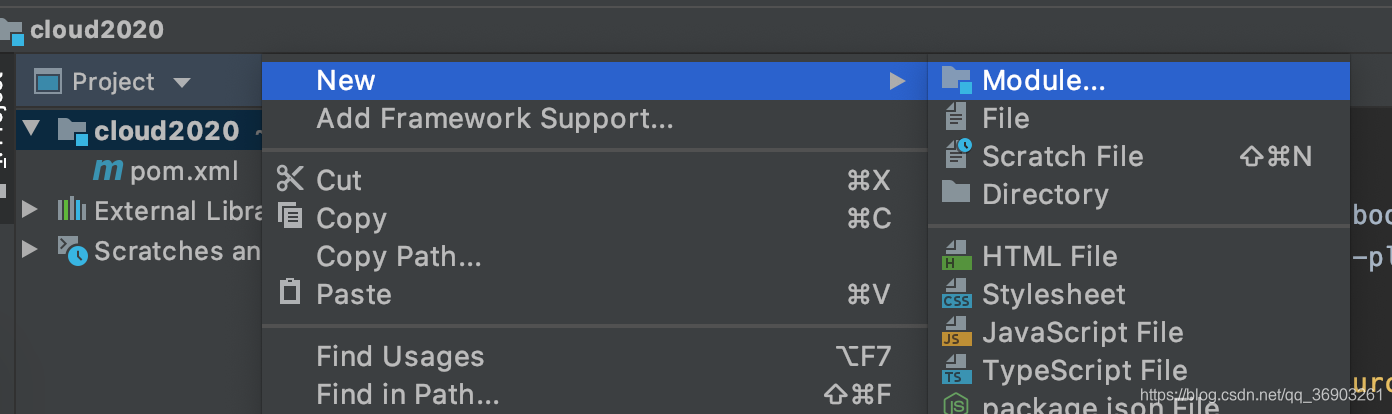
【1】新建模块(建moudle)
在这里插入图片描述

在这里插入图片描述

在这里插入图片描述


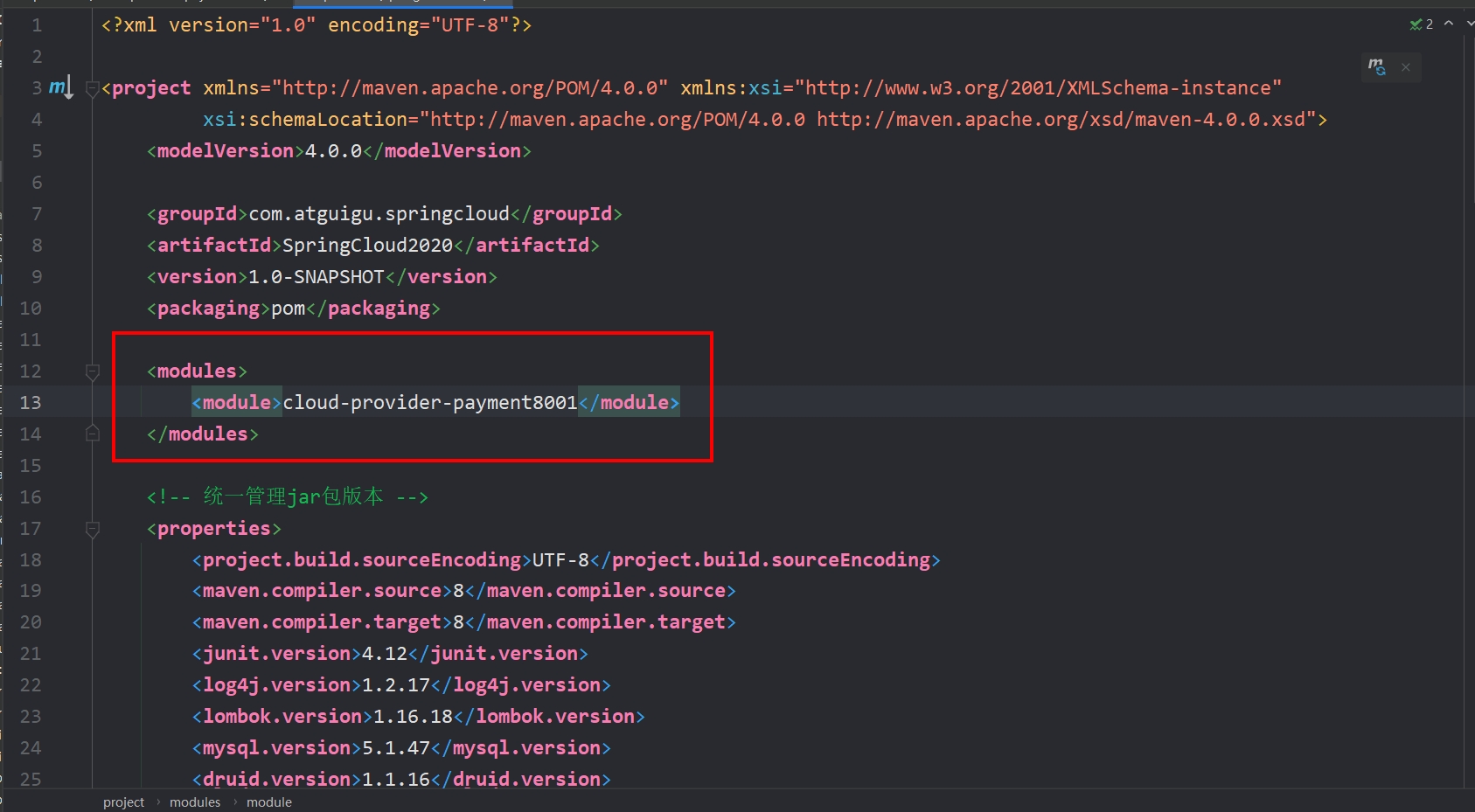
【2】看一下父项目的pom文件,多了一项。说明父子工程已经关联上了

image-20220605152218005.png


【3】cloud-provider-payment8001的pom文件添加内容(改pom)
1
2
3
4
5
6
7
8
9
10
11
12
13
14
15
16
17
18
19
20
21
22
23
24
25
26
27
28
29
30
31
32
33
34
35
36
37
38
39
40
41
42
43
44
45
46
47
48
49
50
51
52
53
54
55
56
57
58
59
60
61
62
63
64
65
66
67
68
69
70
71
72
<?xml version="1.0" encoding="UTF-8"?>
<project xmlns="http://maven.apache.org/POM/4.0.0"
xmlns:xsi="http://www.w3.org/2001/XMLSchema-instance"
xsi:schemaLocation="http://maven.apache.org/POM/4.0.0 http://maven.apache.org/xsd/maven-4.0.0.xsd">
<parent>
<artifactId>SpringCloud2020</artifactId>
<groupId>com.atguigu.springcloud</groupId>
<version>1.0-SNAPSHOT</version>
</parent>

<modelVersion>4.0.0</modelVersion>

<artifactId>cloud-provider-payment8001</artifactId>

<dependencies>

<dependency>
<groupId>org.springframework.boot</groupId>
<artifactId>spring-boot-starter-web</artifactId>
</dependency>

<!-- 监控-->
<dependency>
<groupId>org.springframework.boot</groupId>
<artifactId>spring-boot-starter-actuator</artifactId>
</dependency>
<dependency>
<groupId>org.mybatis.spring.boot</groupId>
<artifactId>mybatis-spring-boot-starter</artifactId>
</dependency>

<!--子工程写了版本号,就使用子工程的版本号,如果没写,就找父工程中规定的版本号-->
<dependency>
<groupId>com.alibaba</groupId>
<artifactId>druid-spring-boot-starter</artifactId>
<version>1.1.16</version>
</dependency>

<!--mysql-connector-java-->
<dependency>
<groupId>mysql</groupId>
<artifactId>mysql-connector-java</artifactId>
</dependency>

<!--jdbc-->
<dependency>
<groupId>org.springframework.boot</groupId>
<artifactId>spring-boot-starter-jdbc</artifactId>
</dependency>

<!--热部署-->
<dependency>
<groupId>org.springframework.boot</groupId>
<artifactId>spring-boot-devtools</artifactId>
<scope>runtime</scope>
<optional>true</optional>
</dependency>

<dependency>
<groupId>org.projectlombok</groupId>
<artifactId>lombok</artifactId>
<optional>true</optional>
</dependency>

<dependency>
<groupId>org.springframework.boot</groupId>
<artifactId>spring-boot-starter-test</artifactId>
<scope>test</scope>
</dependency>
</dependencies>

</project>

【4】在resources目录下新建application.yml配置文件(写yml)
1
2
3
4
5
6
7
8
9
10
11
12
13
14
15
16
17
18
19
20
21
# 微服务建议一定要写服务端口号和微服务名称
server:
port: 8001

spring:
application:
name: cloud-payment-service
# 数据库配置
datasource:
type: com.alibaba.druid.pool.DruidDataSource # 当前数据源操作类型
# 注意mysql版本不同,对应的驱动包名不同
driver-class-name: com.mysql.jdbc.Driver # mysql驱动包
url: jdbc:mysql://localhost:3306/db2019?useUnicode=true&characterEncoding=utf-8&useSSL=false
username: root
# 改成你自己的数据库密码
password: 123456

# mybatis配置
mybatis:
mapperLocations: classpath:mapper/*.xml
type-aliases-package: com.atguigu.springcloud.entities # 所有Entity别名类所在包

【5】在java包下创建主启动类com.angenin.springcloud.PaymentMain8001(主启动)
1
2
3
4
5
6
@SpringBootApplication
public class PaymentMain8001 {
public static void main(String[] args) {
SpringApplication.run(PaymentMain8001.class, args);
}
}

【6】业务类
建表SQL
1
2
3
4
5
6
7
CREATE TABLE `payment`(
`id` BIGINT(20) NOT NULL AUTO_INCREMENT COMMENT 'ID',
`serial` VARCHAR(200) DEFAULT '',
PRIMARY KEY(`id`)
)ENGINE=INNODB AUTO_INCREMENT=1 DEFAULT CHARSET=utf8;

INSERT INTO payment(`serial`)VALUES("张三");

entities:在springcloud包下新建实体类entities.Payment
1
2
3
4
5
6
7
8
//这三个注解是lombok的,除了导入依赖,idea还需要安装插件(具体操作问度娘)
@Data //set/get方法
@AllArgsConstructor //有参构造器
@NoArgsConstructor //无参构造器
public class Payment implements Serializable {
private long id;
private String serial;
}

entities:在entities包下新建CommonResult(json封装体,传给前端的)
1
2
3
4
5
6
7
8
9
10
11
12
13
14
//返回给前端的通用json数据串
@Data //set/get方法
@AllArgsConstructor //有参构造器
@NoArgsConstructor //无参构造器
public class CommonResult<T> {
private Integer code;
private String message;
private T data; //泛型,对应类型的json数据

//自定义两个参数的构造方法
public CommonResult(Integer code, String message){
this(code, message, null);
}
}

dao:在springcloud包下新建dao.PaymentDao接口
1
2
3
4
5
6
7
8
9
10
11
@Mapper
public interface PaymentDao {

//增
int create(Payment payment);

//改 加上@Param注解,mapper中就可以采用#{}的方式把@Param注解括号内的参数进行引用
Payment getPaymentById(@Param("id") Long id);

//这里用增和改进行演示,有兴趣的可以自己加其他的方法
}

mapper:在resources目录下新建mapper目录,然后新建PaymentMapper.xml
1
2
3
4
5
6
7
8
9
10
11
12
13
14
15
16
17
18
19
20
21
22
23
24
25
<?xml version="1.0" encoding="UTF-8" ?>
<!DOCTYPE mapper PUBLIC "-//mybatis.org//DTD Mapper 3.0//EN" "http://mybatis.org/dtd/mybatis-3-mapper.dtd">

<mapper namespace="com.angenin.springcloud.Dao.PaymentDao">

<resultMap id="BaseResultMap" type="com.angenin.springcloud.entities.Payment">
<id column="id" property="id" jdbcType="BIGINT"/>
<id column="serial" property="serial" jdbcType="VARCHAR"/>
</resultMap>


<!-- 增 -->
<!-- Payment标红了不用管,因为我们已经在yml文件中指定了Payment的位置了 -->
<!-- 使用useGeneratedKeys让他返回值,返回的值是id-->
<!--插入成功时使用JDBC的getGenereatedKeys方法获取主键并赋给keyProperty设置的领域模型属性中-->
<insert id="create" parameterType="Payment" useGeneratedKeys="true" keyProperty="id">
insert into payment(serial) values(#{serial});
</insert>

<!-- 改 -->
<!--返回用resultMap,防止命名不规范-->
<select id="getPaymentById" parameterType="Long" resultMap="BaseResultMap">
select * from payment where id=#{id};
</select>
</mapper>

service:在springcloud包下新建service.PaymentService接口
1
2
3
4
5
6
7
public interface PaymentService {

int create(Payment payment);

Payment getPaymentById(@Param("id") Long id);

}

service:在service包下新建impl.PaymentServiceImpl实现类
1
2
3
4
5
6
7
8
9
10
11
12
13
14
@Service
public class PaymentServiceIpml implements PaymentService {

@Resource //@Autowired也可以
private PaymentDao paymentDao;

public int create(Payment payment){
return paymentDao.create(payment);
}

public Payment getPaymentById(Long id){
return paymentDao.getPaymentById(id);
}
}

controller:在springcloud包下新建controller.PaymentController
1
2
3
4
5
6
7
8
9
10
11
12
13
14
15
16
17
18
19
20
21
22
23
24
25
26
27
28
29
30
31
32
33
34
35
36
37
@RestController
@Slf4j //日志
public class PaymentController {

@Resource
private PaymentService paymentService;

//前后端分离,所以不能直接返回对象,数据要先经过CommonResult封装再返回
@PostMapping("/payment/create")
public CommonResult create(@RequestBody Payment payment){
//在mapper.xml配了useGeneratedKeys="true" keyProperty="id",会将自增的id封装到实体类中
int result = paymentService.create(payment);
log.info("******插入的数据为:" + payment);
log.info("******插入结果:" + result);

if(result > 0){
//插入成功
return new CommonResult(200, "插入数据库成功", result);
}else{
return new CommonResult(444, "插入数据库失败");
}
}


@GetMapping("/payment/get/{id}")
public CommonResult getPaymentById(@PathVariable("id") Long id){
Payment payment = paymentService.getPaymentById(id);
log.info("******查询结果:" + payment);

if(payment != null){
//查询成功
return new CommonResult(200, "查询成功", payment);
}else{
return new CommonResult(444, "没有对应记录,查询ID:" + id);
}
}
}

【7】测试:启动项目

在这里插入图片描述


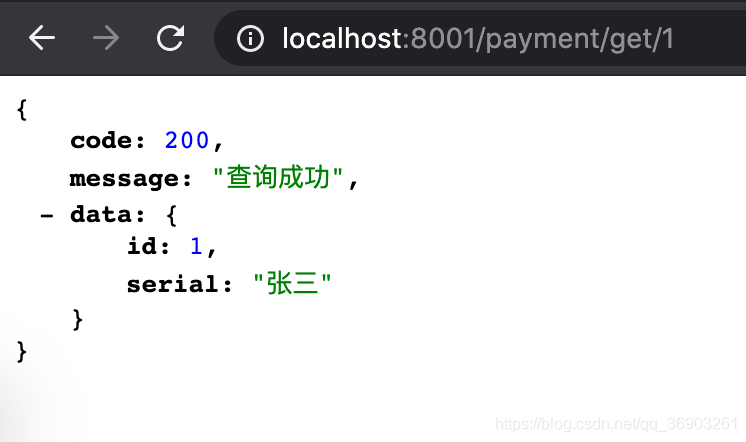
【8】浏览器输入http://localhost:8001/payment/get/1,查询成功
在这里插入图片描述


【9】因为浏览器一般不支持直接发送post请求,所以,需要使用工具进行测试。(我这里用的是Postman)重新测试查询,没问题

在这里插入图片描述


【10】输入http://localhost:8001/payment/create发送post请求,往数据库中插入一条数据,需要把数据写到body中。

在这里插入图片描述


3、热部署Devtools(只能在开发阶段使用,但我更推荐使用JRebel,IDEA中一种不需要重启服务,可以自动编译运行的插件)

【1】在cloud-provider-payment8001项目中添加热部署依赖(已经在导入了,所以看看就行了,记一下步骤)
1
2
3
4
5
6
7
<!--热部署-->
<dependency>
<groupId>org.springframework.boot</groupId>
<artifactId>spring-boot-devtools</artifactId>
<scope>runtime</scope>
<optional>true</optional>
</dependency>

【2】添加一个插件到父类总工程的pom.xml里(这一步之前也已经做了)
1
2
3
4
5
6
7
8
9
10
11
12
<build>
<plugins>
<plugin>
<groupId>org.springframework.boot</groupId>
<artifactId>spring-boot-maven-plugin</artifactId>
<configuration>
<fork>true</fork>
<addResources>true</addResources>
</configuration>
</plugin>
</plugins>
</build>

【3】开启自动编译的选项

在这里插入图片描述

在这里插入图片描述


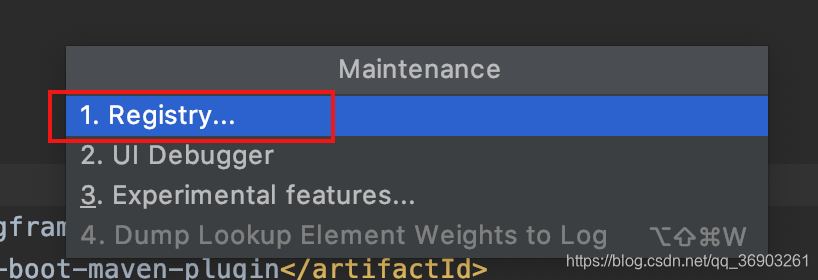
【4】热注册开启:组合键Shift+Ctrl+Alt+/(Mac系统的把Ctrl换成command键),选中Registry…
在这里插入图片描述

在这里插入图片描述

在这里插入图片描述


【5】重启IDEA
开完之后感觉有点卡,虽然能自动部署,但是代码提示变慢了,等以后换了电脑再玩自动热部署,现在就不开了。
把第四步打上的勾去掉(原本打上的就不用去掉了),然后重启idea就可以了。
不使用自动热部署,也可以使用热部署,按这个绿色的锤子,重新启动,只编译改了的文件,所以比重启快一些。

在这里插入图片描述